A Monday morning at a twelve-rep roofing company rarely starts with selling. One rep is working from a power dialer, another is copying numbers from a scraped CSV, and a third is texting prospects from a personal phone. The CRM contains some leads, the spreadsheet contains others, and nobody can say with confidence which records were contacted, which numbers opted out, or who owns the next follow-up.
That setup looks inexpensive until missed calls, duplicate records, stale numbers, and compliance problems begin to consume the team's selling time. Outbound sales software should be judged by how well it prevents those failures, not by how many buttons appear in a product tour. This guide is about the criteria rather than the candidates; when you are ready to name products, our comparison of 10 outbound call center software platforms scores ten of them against exactly these questions.
| Buying priority | What to verify before purchase | Why it matters |
|---|---|---|
| Data readiness | Deduplication, contact validation, freshness dates, exclusion lists | Automation magnifies bad data as quickly as good data |
| Channel orchestration | Calls, email, SMS, voicemail, calendar, and human tasks in one workflow | Prospects don't follow a single-channel buying path |
| CRM integrity | Bi-directional synchronization, automatic activity logging, ownership rules (how the write-back should behave) | Reps and managers need one reliable contact history |
| Dialer execution | Queue logic, power or parallel dialing, dispositions, retries, voicemail handling | More productive conversations depend on what happens between answered calls |
| Compliance workflow | Time-zone controls, consent records, suppression, DNC screening, audit logs | A compliant process must block risky outreach before it happens |
The Real Cost of Running Outbound on Six Different Tools
The roofing company's problem isn't that any one tool is necessarily broken. The dialer may work well. The CRM may have strong reporting. The texting application may deliver messages. The failure comes from making a rep coordinate all of them manually.
A rep finishes a call in the dialer, switches to the CRM, searches for the contact, types a note, switches to the texting application, checks whether the person has opted out, then returns to the spreadsheet to find the next number. If the rep skips one step, the system loses part of the customer history. If the rep skips several steps, the manager sees activity that never happened and misses activity that did.
Three failures appear first
Duplicate records are usually the first visible symptom. A lead imported from a purchased list may already exist in the CRM under a slightly different company name or phone format. The dialer treats it as new, the email platform creates another contact, and two representatives can contact the same person without knowing it.
Dropped leads follow closely behind. A missed call becomes a forgotten note. An inbound text stays in a personal inbox. A rep leaves the company, taking follow-up context with them. The business may still own the lead, but the workflow no longer does.
Unsynchronized opt-outs create a more serious exposure. A contact who replies STOP in one messaging tool may remain active in a separate dialer or email sequence. The next representative sees an apparently callable record because the suppression status never propagated.
Operational rule: If a lead can be called, texted, emailed, booked, or reassigned, every one of those events should write to the same contact timeline.
CRM adoption has moved from a minority practice toward mainstream sales operations. One historical comparison reported adoption at 26% of sales representatives in 2014, 34% in 2018, 48% in 2020, and 58% in 2024, although the source cautions that “adoption” can mean anything from opening the tool to using core features weekly, so the figures are directional rather than perfectly comparable. The trend still explains why CRM adoption has become central to outbound operations, and why an outbound platform that only dials without recording outcomes is incomplete.
The unified workspace standard
A unified platform doesn't eliminate every specialist tool. It does establish one operational record. Calls, texts, emails, dispositions, meeting bookings, consent evidence, and next actions should attach to the same person and account.
For a small home-services team, that means the next available lead appears in a queue without a spreadsheet handoff. For an agency, it means client records remain separated while supervisors can review activity consistently. For a B2B team, it means a sequence can pause when a prospect replies and create a human task with the full conversation visible.
The right question isn't, “Does this tool have a dialer?” Ask instead, “What happens to the record before, during, and after the dial?” If the answer requires several unrelated applications, you're buying another tab, not an outbound operating system.
What Outbound Sales Software Actually Does
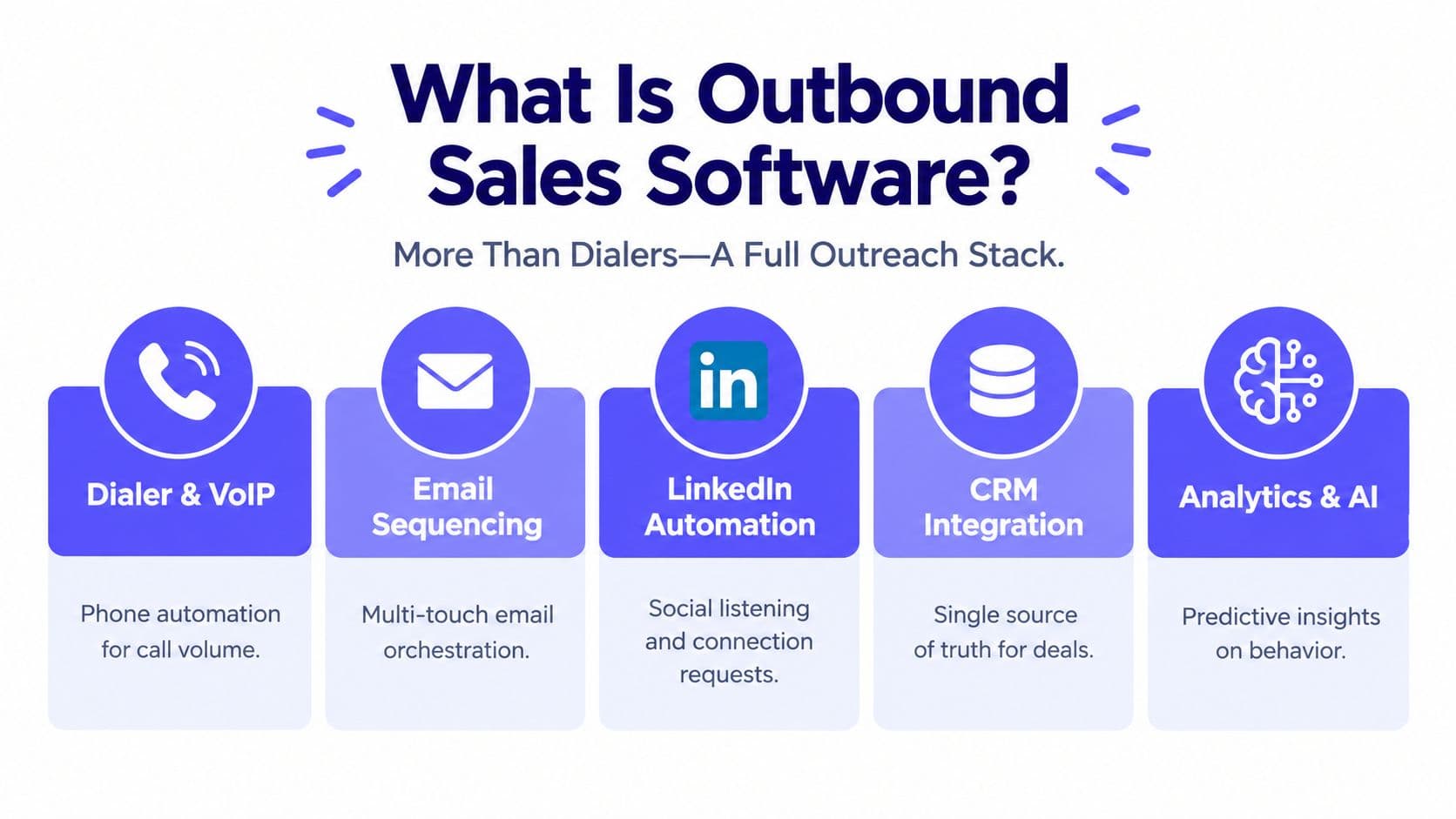
Outbound sales software is the execution layer between a target list and a qualified conversation. A serious platform combines data management, coordinated outreach, dialing, CRM updates, routing, and compliance controls. Vendors may package those functions differently, but buyers should evaluate the underlying behavior rather than the product category on the pricing page.
Six functions every platform must perform
1. Contact and account data management
The minimum standard is not contact storage. The platform should detect duplicates across imports, normalize phone and email fields, show when a record was verified, and identify missing information before the lead enters a queue. Enrichment is useful only when the new data is traceable and does not overwrite reliable existing fields without an audit trail.
2. Multi-channel sequencing
A sequence should coordinate email, SMS, calls, voicemail tasks, and human actions. It must detect replies, branch on outcomes, pause after a meeting is booked, and suppress a contact after an opt-out. A calendar of scheduled sends isn't enough. The system needs conditional next actions based on what the prospect did.
An analysis of more than 16.5 million cold emails found an 8.4% reply rate for the initial message, while 42% of all replies came from follow-up messages. The cold-email follow-up analysis supports measuring the full sequence, including delivered messages, unique replies, positive replies, meetings, unsubscribes, and complaints, rather than judging the first touch alone.
3. Dialer mechanics
Look for a queue that moves automatically to the next eligible record, supports power or parallel dialing where appropriate, handles voicemail drops, and records accurate dispositions. Dynamic caller ID or local presence can be useful, but only if the platform clearly explains how caller identity, consent, and callback handling work.
4. CRM synchronization
The minimum acceptable integration writes calls, notes, dispositions, tasks, stage changes, and ownership updates back to the CRM. Stronger systems synchronize in both directions, so a CRM status change can remove a record from an active sequence instead of leaving the outreach platform with stale instructions.
5. Lead routing and queue logic
A routing engine should assign leads by territory, skill, language, availability, account ownership, and priority. It should also support reassignment when a representative is unavailable and preserve the reason for every transfer. A shared queue without ownership rules creates the same ambiguity as a spreadsheet.
6. Compliance automation
Compliance should sit inside the workflow engine. The platform needs local-time checks, DNC and suppression handling, consent evidence, channel-specific permissions, and an audit history showing why a record was allowed or blocked. Manual review after a call is too late.
A vendor demo should map every feature back to one of these functions. If the representative spends the entire call showing templates, AI-written openers, or dashboard colors but can't demonstrate a blocked contact, a reply-triggered pause, a duplicate merge, and a two-way CRM update, the evaluation is incomplete.
Why Dialing Mechanics Matter More Than Feature Lists
Dialing efficiency sets the ceiling for a phone-led outbound team. Historical cold-call data cited in industry research found that 28% of attempts were answered, 55% went unanswered, and 17% reached non-working numbers. Separate historical data reported that the average attempts needed to reach a prospect rose from 3.68 in 2007 to 8 in 2014. These figures aren't a universal benchmark for every market, but they show why queue management and persistence became software problems rather than simple rep habits. The cold-calling data and workflow analysis provides the relevant context.
The mechanics worth paying for
Parallel dialing can reduce idle time when the system uses answer-rate safeguards and immediately connects a live person to an available representative. Without those controls, parallel dialing can create abandoned calls, awkward delays, or representatives answering multiple prospects at once.
Power dialing is a better fit when a team needs more control over call order, territory, and compliance, and what a power dialer is walks through that call loop in detail, with power dialer vs predictive dialer covering the throughput-versus-abandonment trade-off behind the choice. The platform should move through eligible records automatically while allowing supervisors to define what happens to unanswered, invalid, busy, and callback outcomes.
Voicemail handling should be tied to the campaign and disposition. Representatives need campaign-specific recordings, a clear indication that a voicemail was left, and a rule that prevents the same contact from receiving an inappropriate repeated message.
Dispositioning must trigger the next action. “No answer” might schedule a retry. “Wrong number” should suppress or route the record for correction. “Call back later” needs a time-bound task. “Not interested” should follow the relevant suppression policy instead of remaining in the active queue.
Retry logic should be transparent and configurable. Don't accept a vague promise of “smart retries.” Ask the vendor to show the exact conditions that move a record between call-now, retry, callback, and recycle queues, along with the audit record created at each step.
A platform with impressive email templates but weak queue behavior is a content tool. For a phone-led team, test the dialer before you test the AI copywriter.
Use this comparison of power and predictive dialers to clarify which dialing mode fits your staffing model and risk tolerance. Then test a real queue with answered calls, voicemails, invalid numbers, callbacks, and opt-outs. A polished demo sequence won't reveal how much time the system wastes between those outcomes.
Comparing Core Capabilities Across Modern Platforms
Two products can both claim to offer calling, SMS, CRM integration, and sequences while behaving very differently. An entry dialer may push a completed call into a CRM as a single activity. A more mature suite may update the contact, owner, stage, task list, sequence state, and reporting dimensions at the same time.
| Capability | Entry Dialer | Mid-Market Suite | Enterprise Platform |
|---|---|---|---|
| Power and parallel calling | Basic queue, manual dispositions, limited retry controls | Configurable queues, voicemail drops, caller-ID options, callback logic | Complex routing, permissions, monitoring, regional controls, and audited changes |
| Email and SMS sequences | Scheduled email steps and simple text reminders | Multi-step branching, reply detection, SMS workflows, pause rules | Cross-team orchestration, governance, approvals, and advanced event triggers |
| CRM architecture | One-way activity push or CSV export | Native integration with field mapping and selected bi-directional updates | Deep bi-directional sync, custom objects, data governance, and event handling |
| Compliance controls | Manual DNC review and basic opt-out fields | Time-zone blocking, suppression lists, consent fields, audit history | Registry workflows, granular permissions, policy controls, audit reporting, and legal review support |
| Reporting depth | Calls, connects, and basic outcomes | Funnel reporting by rep, campaign, source, channel, and disposition | Custom analytics, historical change tracking, forecasting, attribution, and operational dashboards |
Where the labels hide the differences
Ask whether voicemail drops are stored centrally or uploaded separately by each representative. Ask whether SMS supports two-way conversations, MMS, toll-free sending, and automated suppression. Ask whether the CRM integration is genuinely bi-directional or only pushes activities out of the outreach tool.
Sequence triggers deserve the same scrutiny. A regex-based trigger may react to a narrow text pattern, while an event-based branch can respond to a reply, booked meeting, missed call, form submission, or stage change. Those are materially different capabilities even though both may appear in a feature checklist.
Reporting also varies sharply. “Calls made” tells a manager little without connection outcome, lead source, queue age, representative, time of day, and next action. The reporting system should show where leads stop moving, not just count how much activity occurred.
For a team under ten representatives, a lightweight dialer plus a reliable CRM can be sufficient if the call motion is simple and one person owns administration. A growing B2B team needs branching sequences, channel coordination, and stronger CRM synchronization. At larger scale, one-way integrations, shared credentials, and spreadsheet-based suppression become operational liabilities.
Use this guide to sales prospecting software to separate list creation from outreach execution before comparing vendors. The best platform isn't the one with the longest feature list. It's the one whose weakest critical capability won't break your process.
Building Compliance Into the Lead Queue
Compliance should function like a traffic light. A record either passes the required checks and enters the queue, or it stays blocked with a visible reason. Supervisors shouldn't depend on representatives remembering which spreadsheet contains the latest opt-out list.
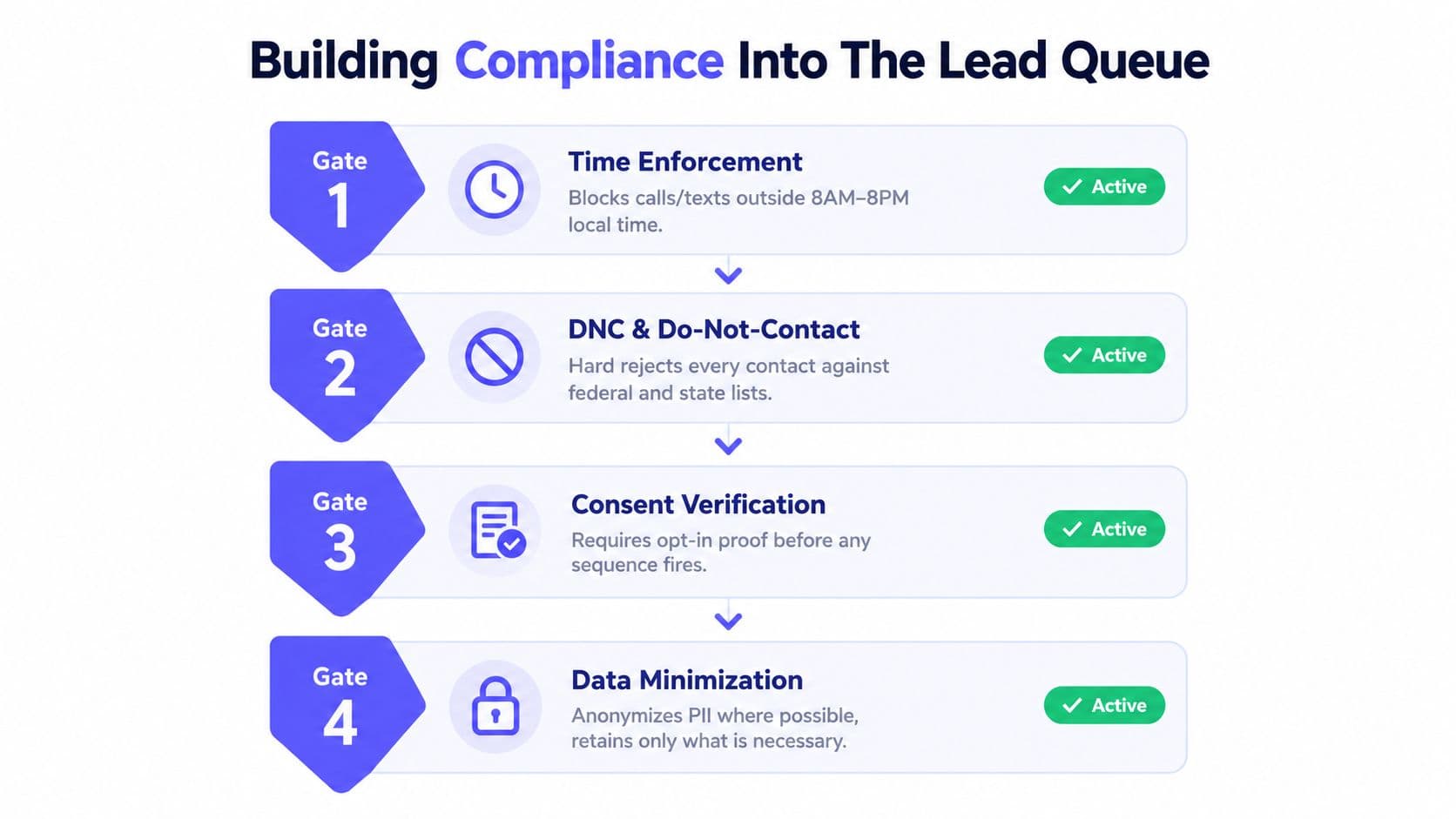
Four gates belong before outreach
Time enforcement should use the recipient's local time, not the caller's office hours. Under the FTC Telemarketing Sales Rule, outbound telemarketing calls to a consumer's home generally can't be made before 8:00 a.m. or after 9:00 p.m. in the recipient's local time, unless the consumer previously consented to different hours. The same operational discipline should govern scheduled texts and automated tasks.
DNC and suppression screening should run before a record enters a sequence and again before an action fires. Internal do-not-call requests, campaign exclusions, invalid numbers, and revoked permissions need a hard stop, not a warning that a representative can dismiss.
Consent verification must preserve evidence. For automated outbound calls and SMS, FCC guidance on unwanted robocalls and texts explains that autodialed or prerecorded calls and texts to wireless numbers generally require consent, while prerecorded telemarketing calls require prior written consent. Store the opt-in source, timestamp, phone number, disclosure presented, campaign or business identity, and channel covered by the consent.
Opt-out handling should propagate across channels. A person who asks not to receive texts shouldn't remain active in a related SMS sequence because the request arrived through a different inbox. A callback request or email opt-out may require a separate policy, but the system should make the status visible and enforce it consistently.
SMS keywords are controls, not copy suggestions
Your SMS workflow should recognize STOP, END, CANCEL, UNSUBSCRIBE, and QUIT, including capitalization and reasonable variants. Those terms should immediately suppress future promotional texts and create a logged event on the contact record.
HELP should trigger a response identifying the messaging program and explaining how to get additional assistance. FCC materials state that a sender may send one final automated text confirming an opt-out, but subsequent advertising messages must stop. Test those behaviors before launch, including mixed-case keywords, punctuation, replies from an alternate number, and a contact who opts out after a scheduled message has already been queued. The FCC guidance on SMS opt-out handling should be part of the implementation review.
A supervisor needs one view of blocked records, consent status, recent opt-outs, and the rule that caused each suppression. The operational payoff is cleaner reporting and fewer risky touches, but only if the compliance gate sits in the lead queue rather than in a separate legal spreadsheet.
For an implementation checklist, use the TCPA compliance checklist for outbound workflows while configuring permissions, suppression rules, consent fields, and audit access.
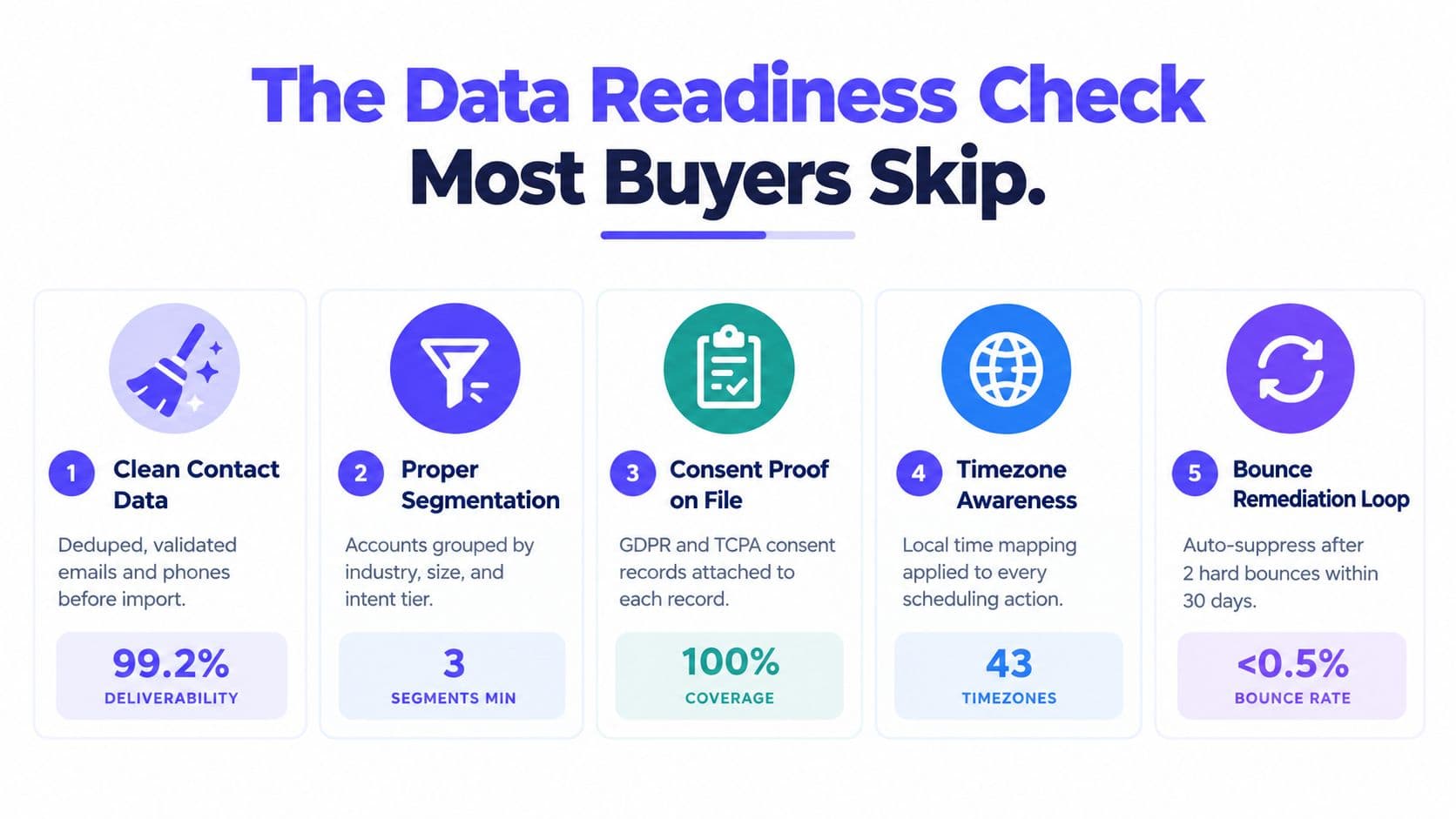
The Data Readiness Check Most Buyers Skip
More automation doesn't automatically produce more selling. If the source list contains duplicates, stale contact details, wrong assignments, or people who should never be contacted, a faster dialer reaches bad records sooner.
A 2025 survey of 602 CRM users and administrators across the United States, the United Kingdom, and Australia found that 76% said less than half of their CRM data was accurate and complete, while 37% reported losing revenue directly because of poor data quality. The CRM data quality survey makes the buying implication clear: data controls belong beside dialing speed and sequence design. Where those records come from is its own decision, and our comparison of 10 B2B prospecting tools covers the sourcing, enrichment, and phone-verification layer that feeds the queue.
Use a pre-outreach gate
Verify contactability. Check phone and email fields before records enter an active sequence. Mark the verification date and source so the team can distinguish a recently checked number from an old import.
Deduplicate across sources. Match phone, email, domain, company, and relevant account identifiers against the CRM and previous campaign lists. Don't rely on exact company names, because punctuation, abbreviations, and trading names create false negatives.
Enrich with purpose. Append firmographic, technographic, and intent signals only when they change routing, message relevance, or prioritization. Extra fields create clutter when no workflow uses them.
Segment before sending. Tag persona, lifecycle stage, territory, source, prior engagement, and ownership. A home-services lead who requested a quote needs a different action from a cold commercial prospect, even if both records contain a phone number.
Define exclusions. Keep customers, recent opt-outs, competitor domains, employees, partners, invalid contacts, and active opportunities out of prospecting sequences. Exclusion lists should update automatically when the CRM status changes.
Measure blocked records as a quality signal
Don't report only the number of records launched. Track how many were deduplicated, missing required fields, blocked by suppression, rejected for invalid contact details, or routed for review. Those numbers reveal whether the sourcing process is improving or merely feeding the same problems into a newer platform.
Data quality also affects personalization and sender reputation. A wrong industry label produces irrelevant copy. A stale inbox generates failures. A duplicate contact receives repeated messages from different representatives. None of those problems is solved by adding AI.
The best outbound sales software is only as effective as the records it touches. Make the platform prove that it can reject bad records before it proves that it can process more of them.
Matching the Right Platform to Your Team
The right platform depends on the team's selling motion, not on the number of features in the vendor's brochure. A home-services crew, a B2B SDR team, and an enterprise revenue organization need different balances of speed, control, administration, and reporting.
| Archetype | Team Size | Core Strength | Watch-Out | Best Fit |
|---|---|---|---|---|
| Lightweight dialer plus CRM | 3 to 10 seats | Fast calling, simple queues, direct contact history | Limited branching, shallow analytics, weaker governance | Home services and local teams led from the phone |
| Sequence-led engagement suite | 10 to 40 seats | Multi-channel cadences, CRM sync, rep and campaign reporting | More administration and possible add-on costs | B2B SDR teams coordinating email, calls, SMS, and social tasks |
| Enterprise orchestration platform | 40+ seats | Governance, permissions, routing, compliance, custom reporting | Higher implementation effort and administrative overhead | Distributed operations with dedicated sales operations and legal support |
Small home-services teams
Choose a dialer-plus-CRM platform when representatives spend most of their day calling local prospects and booking appointments. Prioritize queue speed, territory assignment, voicemail handling, calendar availability, duplicate prevention, and local-time controls.
Don't overbuy a complex engagement suite if nobody will administer branching logic or maintain custom reports. A smaller team needs reliable defaults and fast onboarding more than an expansive automation canvas.
B2B SDR teams
A sequence-led engagement suite fits a team coordinating several touches over time. Require conditional branches, reply detection, automatic sequence pauses, CRM synchronization, shared inboxes, ownership rules, and reporting by source, representative, channel, and elapsed time.
AI personalization can support this motion, but it shouldn't decide whether a message is appropriate without data and suppression checks. HubSpot's 2025 survey of more than 1,000 global sales professionals found that 37% of representatives used AI tools, while 84% said AI saved time, 83% said it improved personalization, and 82% said it surfaced better data insights. The same survey reported a higher response rate for social outreach than email, 42% versus 26%, so teams should evaluate orchestration across channels rather than assume email automation solves the entire journey. The 2025 sales AI survey supports using AI as an execution aid, not as a substitute for routing and timing rules.
Larger operations
A governed orchestration platform becomes necessary when multiple teams, regions, brands, or legal policies share the same outreach infrastructure. Look for role permissions, approval workflows, event-level audit logs, queue monitoring, registry screening, consent history, data retention controls, and reliable CRM synchronization.
Response time also needs its own dashboard. A Harvard Business Review study of more than 2,200 U.S. companies reported that organizations contacting a lead within one hour were nearly seven times more likely to achieve a meaningful conversation with a decision-maker than organizations waiting an additional hour, and 23% of audited companies never responded. The lead response-time findings justify tracking first attempted contact, first live conversation, booked appointment, and response latency by source and business hours.
Use this fifteen-minute decision checklist before booking a demo:
- Team size: Is the platform simple enough for a small crew or governed enough for a larger operation?
- Primary channel: Does the system handle your real motion, calls, SMS, email, social tasks, or a combination?
- Data readiness: Can it deduplicate, validate, segment, and block records before outreach?
- CRM behavior: Does it write outcomes back automatically and respond to CRM changes?
- Queue execution: Can it show the next action for answered, unanswered, invalid, callback, and opted-out records?
- Compliance exposure: Does it enforce local time, consent, DNC status, and SMS suppression before sending?
- Response speed: Can managers measure the interval from lead creation to first attempt and booked meeting?
- Administration: Who will maintain routing, sequences, suppression rules, permissions, and reports?
One question sits underneath all eight: how much of the cycle each rep owns. Our guide to full cycle sales covers where that capacity limit sits, because a team splitting prospecting from closing needs different software from one where the same rep carries a deal end to end.
GrowOutly combines outbound dialing, inbound call routing, two-way SMS and MMS, email sequences, CRM timelines, lead collection, compliance checks, and calendar booking in one workspace. If your team wants to evaluate outbound sales software around data readiness, channel coordination, and auditable follow-up instead of isolated feature checklists, visit GrowOutly and review how its workflow fits your operation.