The biggest contact database isn't automatically the best sales prospecting software. A large library can still produce unreachable numbers, stale job titles, weak buying context, and queues that force reps to work around the system instead of selling.
Prospecting software covers very different jobs. One platform may discover or scrape leads, another may validate contact data, and another may coordinate email sequences, calling, SMS, CRM logging, analytics, or compliance controls. Comparing them by database size alone hides the operational question that matters most: can your team move a qualified prospect from discovery to a relevant conversation without losing context?
This list evaluates each tool by the workflow it supports, including data freshness, calling, SMS, email, CRM ownership, analytics, geography, vertical fit, implementation effort, pricing model, and compliance responsibility. It also applies practical prospecting disciplines: define consent rules before outreach, keep lists clean, personalize messages, coordinate channels, block dedicated prospecting time, batch similar work, test messaging, and follow up consistently. Those practices align with guidance covering dedicated prospecting time, research before each touch, quality over volume, and KPIs such as connect rate, response rate, meeting conversion, pipeline contribution, and conversion by stage from ZoomInfo's sales prospecting guide.
1. GrowOutly
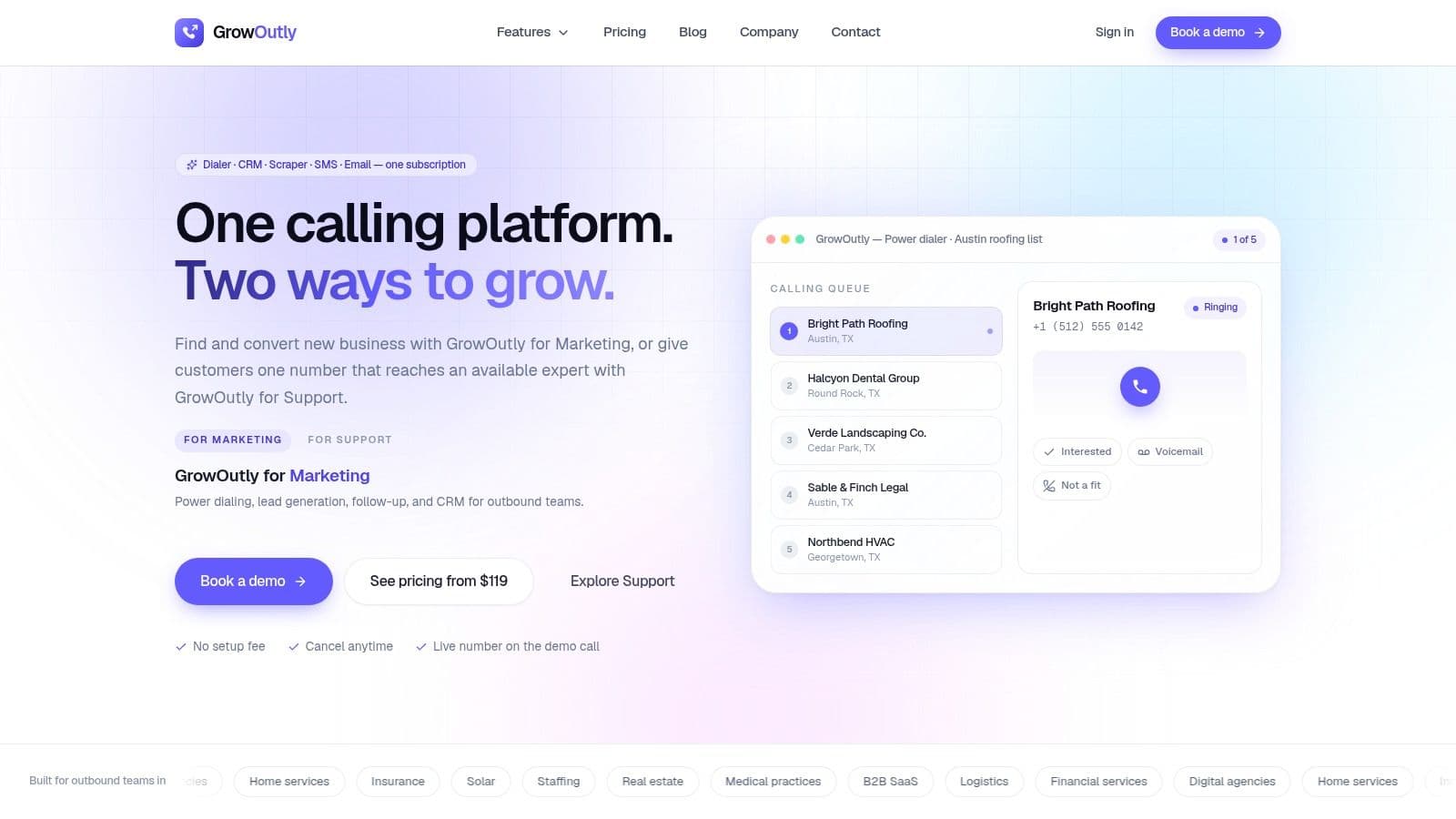
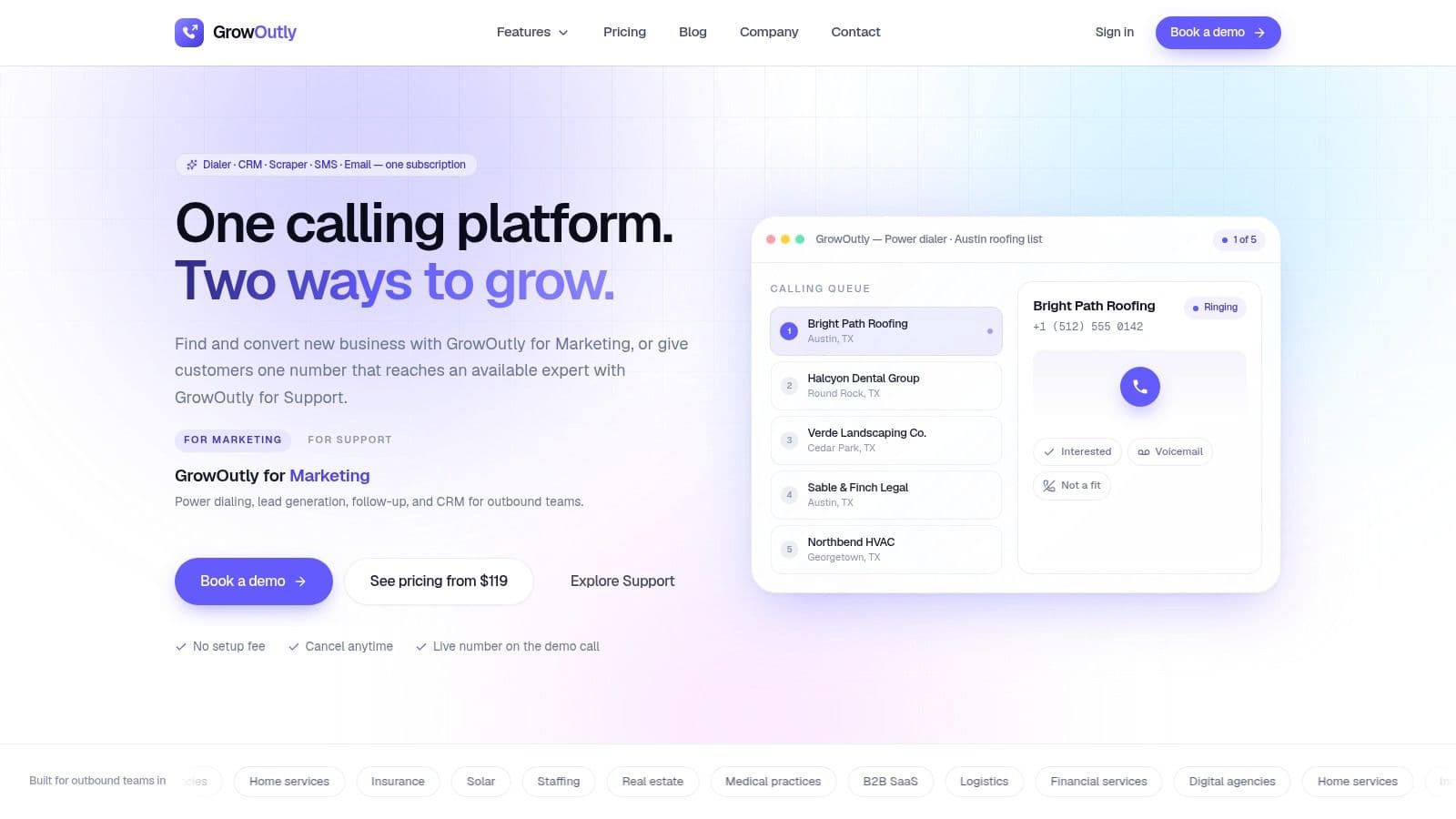
GrowOutly fits teams whose workflow starts with local lead discovery and ends with a call, booked meeting, or logged follow-up. It combines Google Maps scraping, outbound power dialing, inbound routing, two-way SMS and MMS, email sequences, calendar booking, and a built-in CRM. That combination suits agencies, home services companies, insurance and solar teams, B2B service firms, recruiters, and support teams that would otherwise move records between several systems.
Best for speed from lead to conversation
The Google Maps scraper creates dial-ready lists and checks for CRM duplicates. GrowOutly states that the average time from scraping to the first dial is 48 seconds, which could matter for territory-based outreach where list freshness affects connect rates. Treat that figure as a workflow hypothesis, not a guarantee. Test it with a 20-record sample in your territory, then check list accuracy, duplicate handling, and the time required for a rep to make the first call through GrowOutly's all-in-one sales outreach platform.
The power dialer queues leads, drops voicemails, supports local-presence caller ID, and logs activity automatically. Calls, texts, emails, notes, recordings, transcripts, and bookings remain on the contact timeline. This reduces manual CRM work, although teams should still define ownership rules before importing scraped records.
Inbound workflows receive similar attention. IVR, skills-based routing, support queues, and availability-aware context help agents see relevant information when a caller connects. That makes GrowOutly more suitable than a basic outbound dialer for teams handling both prospecting and incoming calls.
Practical rule: A fast dialer cannot compensate for a vague audience. Define the ICP, exclusion list, consent rules, and handoff process before automating outreach.
Compliance and operating cost
GrowOutly provides pre-dial and pre-SMS checks for National DNC, 50-state DNC, curfews, and telemarketing litigator lists. It also includes audit logs, call recordings, transcripts, and role-based permissions. Customers remain responsible for consent, registrations, carrier requirements, and applicable telemarketing and messaging laws. International teams must verify country coverage and local rules before deployment.
Public pricing uses paid tiers with different allowances for calling minutes, SMS messages, virtual numbers, and onboarding support. Higher-volume teams should model carrier charges, message volume, number requirements, and recording or storage needs before choosing a tier. Pricing and included usage can change, so confirm current entitlements during procurement.
The platform also offers an on-demand network of vetted cold callers who work inside the system. That can add capacity without immediate hiring, but managers still need quality checks, scripts, training, and permission controls.
Pros: One workspace for scraping, dialing, CRM activity, email, SMS, calendars, recordings, transcripts, and compliance checks.
Cons: International and high-volume teams must verify carrier coverage, registration requirements, data quality, and total usage costs.
2. Apollo.io
Apollo.io suits teams that want prospect discovery and multichannel execution in one familiar B2B workflow. Its database, sequencing, dialer, LinkedIn tasks, intent signals, CRM logging, and task management reduce the need to assemble separate tools for list building and follow-up.
A practical fit for lean B2B teams
Apollo works well when a representative searches for accounts, selects contacts, enrolls them in a sequence, and manages email, calls, and LinkedIn actions from one workspace. AI personalization can accelerate first drafts, but it shouldn't replace research. The best use is to provide relevant context, then edit the message so it reflects the prospect's role, company situation, and likely problem.
The built-in dialer supports making, receiving, and recording calls, with local-presence options. Parallel or power dialing can suit teams with enough volume to justify a call-first workflow. Advanced dialer capabilities may require a paid add-on, so confirm the exact plan before assuming the base subscription covers the calling motion.
The right Apollo setup is usually narrower than the platform. Start with one ICP, one sequence, and one CRM destination rather than activating every channel at once.
Apollo's credit model and changing introductory features can make entitlements feel fluid. That creates pricing uncertainty for teams that need predictable procurement. Smaller companies should compare the cost of contact reveals, dialer access, seats, and usage against a simpler data provider plus a separate engagement platform.
Apollo is a strong option for a small or mid-sized B2B team that wants a fast start, especially when email is the primary channel and calling is important but not the entire operating model. It's less attractive when the team needs advanced inbound call routing, local-business scraping, deep compliance automation, or highly specialized regional data. Teams should also decide which system owns the final contact record before launching sequences, otherwise Apollo and the CRM can develop conflicting statuses.
Use Apollo.io for B2B prospect discovery and engagement. This list is about the workflow from discovery through to a booked conversation; if what you actually need is a contact-data layer, our comparison of 10 B2B prospecting tools covers the sourcing, enrichment, and phone-verification providers instead, including UpLead, LeadIQ, and RocketReach.
3. ZoomInfo SalesOS with Engage
ZoomInfo SalesOS with Engage is built for organizations that treat account intelligence as a core part of prospecting. It combines company and contact data, firmographics, org charts, buying-committee mapping, intent signals, CRM integrations, sequences, and a power dialer.
Account planning before activity volume
This is a better fit for complex B2B sales motions than for a local operator that needs a clean list and a fast dial queue. Account executives and business development teams can map several stakeholders, identify relevant departments, monitor buying signals, and coordinate outreach around an account plan. Engage adds multichannel sequences, an auto or power dialer, and a Chrome extension for dialing inside daily research workflows.
The platform's strength is breadth and maturity. A large sales organization can use it to standardize account selection, contact research, activity capture, and management reporting. Its depth also creates a governance requirement. Someone must define which intent signals count, how often records are refreshed, who can export contacts, and how CRM ownership works.
Cost and geographic trade-offs
ZoomInfo's quote-based pricing is commonly positioned for larger organizations, and smaller teams may find the commercial model difficult to justify. Contract terms and renewals need careful review. Ask for a written explanation of seat limits, data access, Engage functionality, export rules, renewal treatment, and any separate costs for intent or dialer capabilities.
The product is particularly suitable for enterprise and mid-market account-based selling, where missing one buying-committee member can weaken an otherwise strong opportunity. It's less suitable for a small team that needs transparent self-serve pricing or for a workflow centered on scraping local businesses from maps.
ZoomInfo also shouldn't be treated as a substitute for human verification. Data depth helps a rep prioritize accounts, but each contact still needs a relevance check before enrollment. A title can be accurate while the person remains uninvolved in the purchase.
Explore ZoomInfo SalesOS and Engage when account intelligence, intent, and structured ABM matter more than a lightweight prospecting stack.
4. Cognism
Cognism is a strong candidate for teams prospecting across Europe and other markets where mobile coverage, privacy expectations, and cross-border process discipline matter. Its positioning centers on GDPR-aligned data sourcing, global mobile numbers, enrichment, direct-dial data, and its Diamond Data tier for verified mobile numbers.
EMEA-first data decisions
Many sales stacks were designed around US-centric contact coverage. Cognism is worth considering when an EMEA team has experienced missing mobile numbers, inconsistent regional coverage, or uncertainty around data provenance. Its data can feed the sequencing and CRM tools a sales team already uses rather than forcing the company into a completely new engagement workspace.
The compliance posture is useful, but it doesn't transfer legal responsibility to the vendor. Your team still needs a lawful basis, documented outreach rules, suppression procedures, and a process for handling objections and deletion requests. This is especially important when representatives work across countries with different expectations for email, calls, and SMS.
Procurement requires discipline
Cognism doesn't publish simple list pricing. Annual contracts and custom quotes are standard, and reported renewal uplifts make negotiation important. Ask for a price lock, renewal ceiling, data-quality commitments, user limits, export terms, and cancellation language before signing. A multi-year agreement may improve predictability, but it also reduces flexibility if coverage or usage changes.
Cognism fits larger EMEA-focused sales teams, regulated businesses, and cross-border outbound programs that need mobile data and enrichment. It may be excessive for a local business with a narrow territory or a founder who needs only occasional contact research. It also isn't a complete replacement for a dialer, SMS system, or sales engagement platform unless those functions are supplied elsewhere.
Evaluate Cognism's B2B data and prospecting platform against the actual countries, personas, and channels your team uses. Regional accuracy matters more than a global coverage claim that doesn't match your target market.
5. LinkedIn Sales Navigator
LinkedIn Sales Navigator is the best option on this list for precise professional-network targeting and relationship-led prospecting. Advanced lead and account filters, alerts, relationship paths, account maps, TeamLink, and CRM connections help representatives identify the right people and find warmer routes into an account.
Best for research and social context
Sales Navigator is particularly valuable when job changes, company updates, shared connections, team structures, and visible professional activity influence timing. A rep can build an account view, save relevant leads, monitor alerts, and use that context to write a more credible email or call opening.
Its weakness is channel completeness. LinkedIn messaging and InMail aren't a full sequencing system, and the platform generally works best alongside email, calling, CRM, or sales engagement software. A team that expects Sales Navigator to automate every touchpoint will need another layer for cadence management, phone activity, SMS, and detailed cross-channel reporting.
Research should change the message. If a profile alert doesn't affect the reason for contacting someone, it probably isn't useful context yet.
Higher tiers add capabilities such as TeamLink and CRM write-back, but cost can rise as adoption expands across a sales organization. Managers should decide whether every rep needs a license or whether a smaller group can conduct account research and distribute qualified opportunities.
Sales Navigator fits consultative B2B sales, recruiting, executive services, agencies, and account-based motions where the professional graph is central to qualification. It's less useful as a standalone tool for local trades, high-volume consumer outreach, or teams that need automated calling and SMS. It also requires careful coordination with LinkedIn's platform rules and your company's outreach policy.
Visit LinkedIn Sales Navigator when relationship mapping and buyer context are more important than owning a large contact database.
6. Outreach
Outreach is designed for revenue organizations that need standardized sequences, pipeline discipline, conversation intelligence, coaching, and management visibility. It supports multichannel engagement, AI-assisted content, task and rhythm prioritization, and broader deal-management workflows.
A system for repeatable execution
Outreach makes sense when managers need to define how prospecting happens and inspect whether representatives follow that process. Conversation intelligence and coaching can help teams review calls, identify recurring objections, and improve messaging. The platform is also suited to organizations where sales development, account executives, and managers need shared definitions for activity, handoffs, and pipeline hygiene.
The trade-off is operational weight. A lean team may spend more time configuring stages, rules, integrations, permissions, and reporting than it would with a simpler tool. Adoption depends on manager involvement. If leaders don't maintain sequences and review outcomes, the platform can become an expensive task list.
Pricing is quote-based, and the consumption model includes AI action credits alongside seats. That can make budgeting less predictable than a straightforward per-user subscription. Procurement should ask how credits are consumed, what happens when they run out, which AI features are optional, and how usage is forecast across teams.
Outreach fits mid-market and enterprise sales organizations with dedicated operations support, multiple managers, and a need for consistent execution. It's less appropriate for a solo representative, a small local sales team, or a company that mainly needs fresh data and a dialer. It also won't remove consent and deliverability responsibilities from the operator.
For a broader comparison of enterprise and mid-market options, see sales engagement platforms for outbound teams, then review Outreach's platform.
7. Salesloft
Salesloft brings cadences, a native dialer, messaging, call recording, coaching, and pipeline or forecasting add-ons into a sales engagement environment. It's a well-rounded choice for mid-market and enterprise teams standardizing how representatives research, contact, and follow up with prospects.
Strong cadence orchestration
The platform's cadence workflow can coordinate email, calling, SMS, and tasks in one operating rhythm. Rhythm prioritization helps representatives decide which action deserves attention instead of treating every contact in a queue as equally important. LocalDial and local-presence functionality support calling workflows, while recording and coaching features give managers material for ramping and quality reviews.
That combination works best when a team has enough activity to benefit from prioritization and enough management structure to maintain the process. A smaller team may prefer a lighter interface with fewer configuration decisions. Complexity isn't automatically a flaw, but every additional rule needs an owner.
Budget for the complete package
Salesloft doesn't publish list pricing, and seat minimums and add-ons influence total cost of ownership. Request a complete quote that includes dialer access, SMS, recording, analytics, integrations, onboarding, support, and renewal terms. Otherwise, the initial price may not represent the workflow you need.
Salesloft fits structured outbound teams, especially those with managers who care about coaching and consistent cadences. It's less attractive for a founder-led motion, a local service business, or a team that needs native lead scraping and a built-in CRM rather than engagement layered onto an existing stack.
SMS also needs operational care. Guidance for B2B texting recommends identifying the sender in the first five words, including a clear opt-out such as “Reply STOP to opt out,” and keeping messages under 160 characters to reduce splitting and garbled delivery, as explained in B2B SMS outreach guidance. Those requirements should shape the cadence design, not be added after launch.
Read about what a sales engagement platform does and assess Salesloft's sales engagement tools against your team's actual cadence and coaching needs.
8. Seamless.AI
The platform suits teams that need contact discovery at the moment an account enters their target list, rather than relying only on a static database. It researches email addresses and mobile numbers in real time, provides enrichment, and includes a free API across plans. Its Connect module links email, calling, and task workflows, while optional AI Fields add research context for qualification.
Useful when static records fail
Freshness is the main reason to consider this tool. A representative can search for a contact when a target account becomes relevant, then pass the result into a custom enrichment pipeline, CRM workflow, or outbound process through the API. That model fits teams whose prospects, territories, or target roles change often.
Real-time discovery still needs a review process. Verify records before adding them to a sequence, especially when a phone number will support calling or SMS. Set confidence thresholds, define duplicate rules, retain source information, and give representatives a clear path for reporting inaccurate records. API limits and credit consumption should be tested against the actual workflow, not a small product demonstration.
The platform lists compliance certifications and coverage involving SOC 2, ISO 27001, GDPR, and CCPA. These details can inform vendor review, but they do not decide whether a specific campaign is lawful. Your company remains responsible for consent, suppression lists, regional requirements, and appropriate data use.
Pricing and procurement questions
Pricing is not fully transparent, and some plans require a sales conversation. Annual contracts and a 60-day advance cancellation window can reduce procurement flexibility. Confirm the credit model, API limits, export rights, cancellation procedure, renewal terms, and treatment of unused credits before signing.
It fits data-oriented teams with technical support and a defined need for on-demand enrichment. A small team seeking transparent self-serve pricing, or one platform covering CRM, calling, SMS, scheduling, and compliance controls, may need another stack. Test Seamless.AI's contact discovery platform using representative companies, geographies, and job titles before committing.
9. Lusha
Lusha offers a straightforward route from browser research to contact reveal. Its database, Chrome extension, LinkedIn and company-site workflow, credit-based phone and email reveals, and CRM integrations make it approachable for smaller teams that want control without adopting an enterprise engagement suite.
A quick-start option for focused teams
A representative can research a company, reveal a contact, push the record to a CRM or marketing system, and begin outreach without a long implementation project. The simple interface is valuable for founders, small agencies, recruiters, and sales teams that need to test a market before committing to a larger stack.
Self-serve plans are more transparent than many enterprise-only vendors, but credits can burn quickly, especially for phone reveals. Model the cost using your actual workflow. If a rep researches several people per account, the apparent low entry price may not reflect the cost of building a usable list.
Data breadth and accuracy can vary by region and persona. Test the exact industries, countries, seniority levels, and contact fields your team needs. A tool that performs well for US software contacts may not perform equally well for local businesses or international mobile numbers.
Lusha is a sensible fit when data discovery is the primary need and outreach happens in an existing CRM or engagement platform. It stops being enough when you need automatic call queues, coordinated SMS, sequence analytics, inbound routing, or embedded compliance decisions.
Use Lusha's prospecting and enrichment platform for targeted research, then establish a clear rule for what qualifies a revealed record for outreach. Don't let a successful contact reveal become automatic permission to call or text.
10. Clay
Clay is a composable prospecting and enrichment workspace for teams that want to build their own data and automation workflows. It can combine multiple data providers, create audiences, run AI research, trigger multistep actions, and connect to APIs, plugins, and custom operating processes.
Best for bespoke prospecting systems
Clay is powerful when the team has a distinct ICP that standard filters can't express. An operator can assemble an audience, enrich it through multiple sources, add research fields, qualify accounts, and send only the right records into a sequencer or CRM. Its Audiences, Account Agents, and Workflows support a living go-to-market data layer rather than a one-time spreadsheet export.
The waterfall approach can improve coverage by trying several data providers instead of treating one database as complete. But waterfall enrichment is now expected in parts of the category, so it shouldn't be the only reason to choose Clay. The more important question is whether the team can maintain source order, field logic, error handling, suppression rules, and deliverability controls.
Operational effort is the price of flexibility
Clay uses Actions and Data credits rather than a simple seat-based model. That structure can feel unfamiliar, especially when one workflow triggers several enrichment or research operations. Forecast usage before launch and set limits so an automation doesn't consume credits unexpectedly.
Clay requires more setup and operations effort than an out-of-the-box database. It fits technical growth teams, RevOps specialists, agencies, and companies with unusual targeting requirements. It's less suitable for a sales team that wants representatives dialing from a ready queue on the first day.
The platform can support dynamic lists and email deliverability controls, but it isn't automatically a replacement for a calling system, CRM, SMS platform, or compliance program. Map each handoff before building the workflow. Visit Clay's prospecting and enrichment workspace if flexibility and API access matter more than simplicity.
Top 10 Sales Prospecting Tools Comparison
| Product | Core features (✨) | UX / Quality (★) | Price & Value (💰) | Best for (👥) | Standout (🏆) |
|---|---|---|---|---|---|
| GrowOutly 🏆 | Power dialer, inbound IVR/routing, 2‑way SMS/MMS, email sequences, Google Maps scraper, built‑in CRM, calendar | ★★★★☆ · 99.95% uptime · auto‑logging, transcripts & audit logs | 💰 Base $119/mo · Pro $319 · Essentials $819 · usage‑based allowances | 👥 Outbound sales, agencies, home services, recruiters, support | ✨ All‑in‑one workspace; pre‑dial DNC/TCPA checks <45ms; ~48s Maps→dial |
| Apollo.io | B2B contact DB, dialer, multichannel sequences, LinkedIn tasks | ★★★☆☆ · solid discovery UX; some dialer features as add‑on | 💰 Low entry; add‑ons & credits can raise costs | 👥 Teams wanting prospect discovery + engagement | ✨ Large contact DB + AI personalization |
| ZoomInfo SalesOS (Engage) | Deep firmographics, intent, org charts; Engage power dialer & sequences | ★★★★☆ · enterprise data depth & integrations | 💰 Quote‑based; often expensive for small teams | 👥 Enterprise ABM, account planning & ops | ✨ Comprehensive intent & buying‑committee mapping |
| Cognism | GDPR‑first sourcing, global mobile coverage, enrichment | ★★★★☆ · strong EMEA phone accuracy & compliance posture | 💰 Custom quotes; annual contracts | 👥 EMEA‑focused teams & regulated outreach | ✨ "Diamond Data" verified mobile numbers |
| LinkedIn Sales Navigator | Advanced lead/account search, Relationship maps, CRM sync | ★★★★☆ · best for social prospecting and warm paths | 💰 Seat‑based; costly at scale (Advanced tiers) | 👥 Teams prioritizing ICP targeting & social outreach | ✨ Best‑in‑class professional graph |
| Outreach | Multichannel sequences, conversation intelligence, AI assists | ★★★★☆ · deep analytics, coaching & cadence control | 💰 Quote‑based; AI consumption credits affect budgeting | 👥 Large sales organizations standardizing outreach | ✨ Strong coaching & conversation intelligence |
| Salesloft | Cadences, native dialer/SMS, call recording & coaching | ★★★★☆ · robust ramp & manager visibility | 💰 Quote‑based; seat mins & add‑ons impact TCO | 👥 Mid‑market & enterprise prospecting teams | ✨ Local presence + advanced call coaching |
| Seamless.AI | Real‑time contact discovery, enrichment, API access | ★★★☆☆ · fresh on‑demand data; developer friendly | 💰 Credits model; pricing/terms sometimes opaque | 👥 Teams needing on‑the‑fly research & automation | ✨ Real‑time search + free API on plans |
| Lusha | Database + Chrome extension, credit reveals, CRM integrations | ★★★☆☆ · simple UI, fast adoption | 💰 Self‑serve plans; credits can burn quickly | 👥 Small teams & individual sellers | ✨ Fast LinkedIn/site reveal workflow |
| Clay | Composable prospecting, audiences, workflows, data waterfalling | ★★★☆☆ · powerful but requires setup/ops | 💰 Actions & data credits model; flexible but complex | 👥 API‑driven ops teams & custom plays | ✨ Waterfalls multiple providers for coverage & cost |
Match the Stack to the Motion
There isn't a universal winner in sales prospecting software. The right choice depends on the motion your team needs to repeat reliably, the data it can trust, the channels it can use lawfully, and the amount of operational work someone can own after implementation.
Start with team size and sales motion. A solo representative or small agency may value fast setup, transparent pricing, and a short path from research to outreach. Apollo or Lusha can work when the primary need is B2B contact discovery and email execution. A team with technical RevOps support may prefer Clay because it can build a custom data layer. A larger account-based organization may justify ZoomInfo SalesOS with Engage, Outreach, Salesloft, or Cognism when account intelligence, coaching, governance, and regional coverage matter.
Then evaluate the vertical and geography. Local businesses, home services, insurance, solar, staffing, and territory-based agencies often need scraping, calling, SMS, scheduling, and CRM context in one workflow. GrowOutly is relevant here because it connects Google Maps discovery to a dial queue, two-way messaging, email follow-up, calendar booking, and contact timelines. EMEA-focused teams should test Cognism against their specific countries and personas. Professional-services and enterprise teams may get more value from LinkedIn Sales Navigator's relationship and account context than from a generic list.
The channel mix changes the decision. Email-first teams need data quality, sequencing, sender protection, personalization, and reply handling. Call-first teams need queue management, voicemail controls, local presence, recordings, answer-rate reporting, and a clean disposition workflow. SMS introduces another layer of consent and opt-out responsibility.
For SMS outreach, use a simple keyword when you ask someone to opt in. Guidance recommends one short word with no spaces or symbols, easy spelling, and no ambiguous mixed-case treatment, as described in SMS keyword guidance from Sinch. Coordinate that keyword with the consent record and suppression process. A keyword isn't a substitute for explaining what the recipient is opting into.
Data freshness deserves more attention than database size. Recent category coverage describes a shift from static list building toward continuously re-ranked live queues, while sales representatives still spend nearly a full day each week prospecting and often encounter stale phone data and weak trust in records, according to Nooks' analysis of AI prospecting platforms. The practical test is simple: can the platform verify, refresh, prioritize, and sequence prospects as signals change?
Roll out the selected system in a controlled sequence:
- Define the ICP: Write down industries, locations, company characteristics, roles, disqualifiers, and buying situations before building a list.
- Set consent rules: Decide which contacts may receive email, calls, or SMS, where consent is required, how opt-outs are stored, and who reviews exceptions.
- Verify the data: Test contact accuracy, mobile coverage, regional fit, duplicate handling, and record freshness using a representative sample.
- Start with a small segment: Use one territory, persona, or account group so the team can isolate workflow problems before expanding.
- Coordinate channels: Give each email, call, and SMS a clear purpose. Don't send a text that repeats an email without adding useful context.
- Personalize the reason: Sales texting guidance recommends a personal first message, a clear call to action, and context specific to the recipient rather than generic outreach, as outlined in sales text message examples from MessageDesk.
- Suppress opt-outs immediately: Make STOP replies, do-not-call requests, bounced addresses, and manual exclusions visible across every connected system. Our TCPA compliance checklist for outbound teams sets out how to run that as one pre-dial and pre-SMS gate rather than per campaign.
- Review operating metrics: Track connect rate, response rate, meeting conversion rate, pipeline contribution, and conversion by stage. Also inspect data errors, opt-out rates, missed tasks, and channel-level performance.
- Expand only after reliability: Add users, territories, providers, and automation after the initial workflow produces clean records and consistent follow-up.
GrowOutly is the relevant all-in-one option for teams that prioritize scraping-to-dial speed, integrated SMS, calling, CRM context, scheduling, and compliance controls. What a power dialer is explains the call loop underneath that speed claim, and power dialer CRM covers the write-back that keeps the record usable afterwards. Its public plans include the core feature set with usage-based allowances, while larger teams can use higher-volume or Enterprise arrangements. The platform's pre-dial and pre-SMS checks can reduce operational exposure, but they don't remove the customer's responsibility for consent or applicable laws. Confirm country and carrier availability before making it the foundation of an international motion.
Prospecting software only decides how many qualified conversations a rep gets. What happens inside them is still execution, so pair the decision with the close sales techniques that turn a live answer into a booked next step.
The best purchase is the system your team will operate correctly every day. Choose the tool that matches your prospecting motion, assigns ownership for data and compliance, and makes the next action obvious without hiding the cost of usage, setup, or governance.
GrowOutly brings lead scraping, outbound power dialing, inbound routing, two-way SMS and MMS, email sequences, scheduling, CRM timelines, recordings, transcripts, and compliance checks into one workspace. If your team needs a faster path from local or targeted lead discovery to coordinated outreach, visit GrowOutly to evaluate the platform and its volume-based plans.