A power dialer is software that dials one number at a time from a preloaded list and only connects a live rep when a human answers. In practice, teams usually run it in focused 60 to 90 minute calling blocks rather than trying to call nonstop all day, because that pacing protects call quality and keeps the workflow usable for reps (power dialer pacing guidance).
If you're reading this, you're probably staring at a call list, a CRM, and a rep team that spends too much of the day waiting through rings, voicemail greetings, and bad numbers. The question usually sounds simple, what is a power dialer, but the question is whether it helps your team work faster without giving up control.
That control piece matters more than most explainers admit. A lot of sales content talks about dialers as speed tools. In production, the better reason many B2B teams choose a power dialer is that it keeps the workflow one rep, one call, one decision at a time. That makes it easier to coach, easier to log clean data, and easier to build sensible compliance guardrails into the motion.
The Rep Who Lost Half a Day to Dial Tones
At 9:10 a.m., Maya opens her list and starts dialing manually. She's trying to hit an 80-dial morning. Instead, she gets two voicemails, a wrong number, a fast hang-up, and one office line that rings long enough to dump her into a queue.
None of that is unusual. It's what outbound work looks like when a rep has to do every mechanical step by hand. She waits for the click, waits through the menu, waits for the voicemail beep, then flips back to the CRM to log what happened before starting over.
By late morning, the gap becomes obvious. The problem isn't just effort. It's that the rep's time is being spent on phone system friction instead of live conversations.
What the tool is actually doing
A power dialer pulls numbers from a preloaded list, places calls sequentially, and moves to the next record based on the outcome. It keeps the rep inside a live-agent workflow instead of forcing them to dial, wait, log, and repeat.
The basic behavior is simple:
- It loads a list: usually from a CRM view, imported CSV, or campaign queue.
- It dials one record: not several at once.
- It branches by outcome: live answer, voicemail, no answer, busy, or bad number.
- It logs the result: then advances to the next record.
Practical rule: If your rep's main complaint is "I waste time between calls," a power dialer is usually the first dialer mode to test.
Why this category exists
Power dialers became practical for mainstream B2B teams in the 1990s, when outbound teams moved away from expensive predictive dialing hardware and into PC-based workflows tied to CRM systems like ACT!, GoldMine, and Maximizer (history of power dialing).
That matters because the category wasn't born as a novelty feature. It came from an operational need. Smaller teams wanted a cheaper way to automate the call queue without adopting the complexity and risk of larger predictive systems.
How a Power Dialer Actually Dials
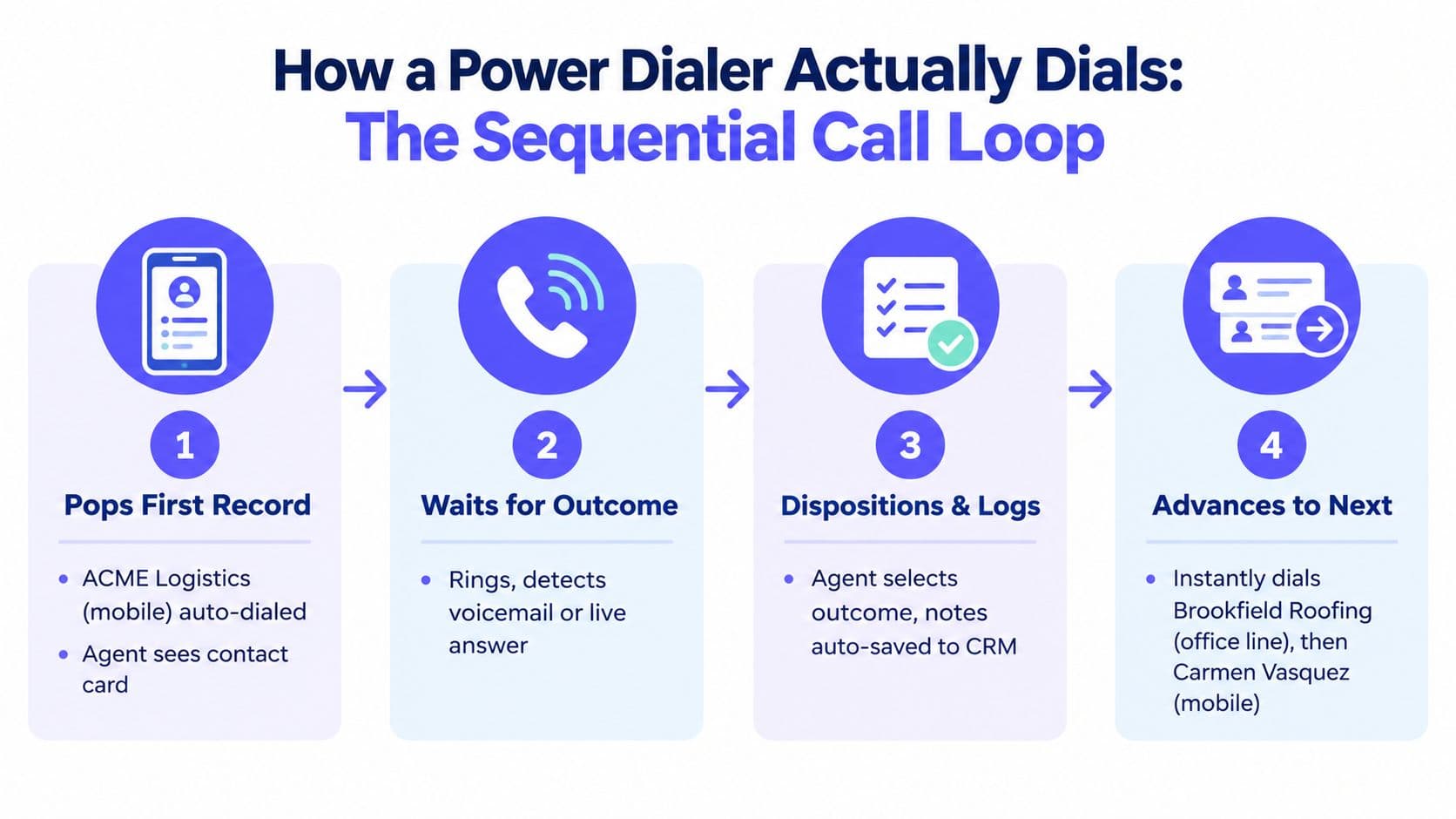
Most articles stop at "it dials the next number." That's not enough if you're training reps or buying software. You need to know the call loop.
Here's a simple example list:
- ACME Logistics on a mobile number
- Brookfield Roofing on an office line
- Carmen Vasquez on a mobile number
A good mental model is a conveyor belt. The dialer doesn't think like a rep. It processes records in sequence and branches based on what the phone network returns.
Step one and step two
The first record pops. The dialer calls ACME Logistics while the rep sees the contact card, account context, and any script notes pulled from the CRM. If you're evaluating platforms, it's worth seeing how outgoing call workflows handle this screen-pop behavior because that handoff affects rep readiness.
Then the system listens for the outcome. In a standard power dialer loop, it dials one number at a time from a preloaded list and only connects the rep when a human answers (power dialer definition and mechanics).
The three branches reps deal with
Branch A: live answer
A person answers. The dialer bridges the call to the rep, and the rep lands in the conversation with the contact record already open.
Branch B: voicemail
The system recognizes a mailbox greeting or beep. Depending on settings, it hangs up or triggers voicemail drop, then marks the attempt accordingly.
Branch C: no answer or dead ring
The system marks the record as unanswered, applies retry logic if your workflow allows it, and advances to the next record.
The biggest difference between a good setup and a messy one is what happens after each branch. Logging rules matter as much as dialing rules.
After ACME, the dialer moves to Brookfield Roofing. If that office line routes into a menu or rings out, it records the attempt and proceeds. Then it tries Carmen Vasquez next. The sequence is steady. The rep doesn't hunt for the next number. The queue does that work.
A short demo helps if you've never watched this loop in motion:
What gets written back
A production dialer shouldn't just place calls. It should write outcomes back to the record. Typical write-backs include:
- Call disposition: connected, voicemail, no answer, bad number
- Activity trail: timestamped call attempt on the contact timeline
- Recording link: if recording is enabled
- Rep notes: entered during or right after the call
That's the part new reps often miss. The dialer isn't only a speed layer. It's a controlled loop for moving through a list and keeping account history clean.
Power Dialer vs Predictive and Auto Dialers
If you're deciding between modes, compare them on the three things that affect operations: throughput, abandonment risk, and rep control.
The broad term "auto dialer" causes the most confusion. It's a category, not one specific behavior. A power dialer is one dialing mode inside that larger category.
The practical difference
A power dialer stays close to the rep. It dials one record for one available rep and waits for the outcome before moving on.
A progressive auto dialer is similar, but it tends to tighten pacing more aggressively. In some setups, the rep gets less breathing room between records.
A predictive dialer dials ahead of rep availability. That's where higher volume comes from, but it's also where silent calls and abandoned calls become more likely when the system's timing is off.
| Dimension | Power Dialer | Progressive Auto Dialer | Predictive Dialer |
|---|---|---|---|
| Throughput | Moderate and steady | Higher than manual, often slightly tighter pacing | Highest raw volume |
| Rep control | High | Medium | Lowest |
| Abandonment exposure | Low because the workflow is one rep to one call | Low to moderate depending on configuration | Highest because calls may connect before a rep is ready |
| Regulatory exposure | Lower-risk posture for list-based, human-initiated outreach | Depends on setup and controls | Usually higher scrutiny because of ahead-of-agent dialing behavior |
| Best fit | B2B outbound, regulated outreach, quality-first teams | Structured call campaigns needing more pace | Large-volume environments optimizing occupancy |
Why many B2B teams still start here
A power dialer is usually the safest place to start when your team cares more about conversation quality and clean execution than maximum raw throughput.
There's also a legal reason this distinction matters. U.S. regulatory interpretation has treated predictive dialers as a specific kind of system, and the 2021 Facebook v. Duguid decision narrowed the statutory autodialer definition to equipment using a random or sequential number generator, which shifted attention toward human-initiated, list-based sequential dialing workflows (FCC order and legal context).
So if someone asks what is a power dialer in practical terms, the answer isn't just "faster calling." It's sequential list dialing with more control and less abandonment risk than predictive systems.
Once you know which mode fits, the next question is which platform implements it well. Our breakdown of outbound call center software compares ten vendors on dialing modes, CRM workflow, compliance controls, and pricing visibility.
Connect Rates, Voicemail Drops, and Daily Pacing
A power dialer does not create demand. It trims the dead air between attempts and gives the team more control over how each call is handled. That matters for productivity, but it also matters for compliance. The more deliberate the call loop is, the easier it is to explain who got called, when, from which number, and what happened next.
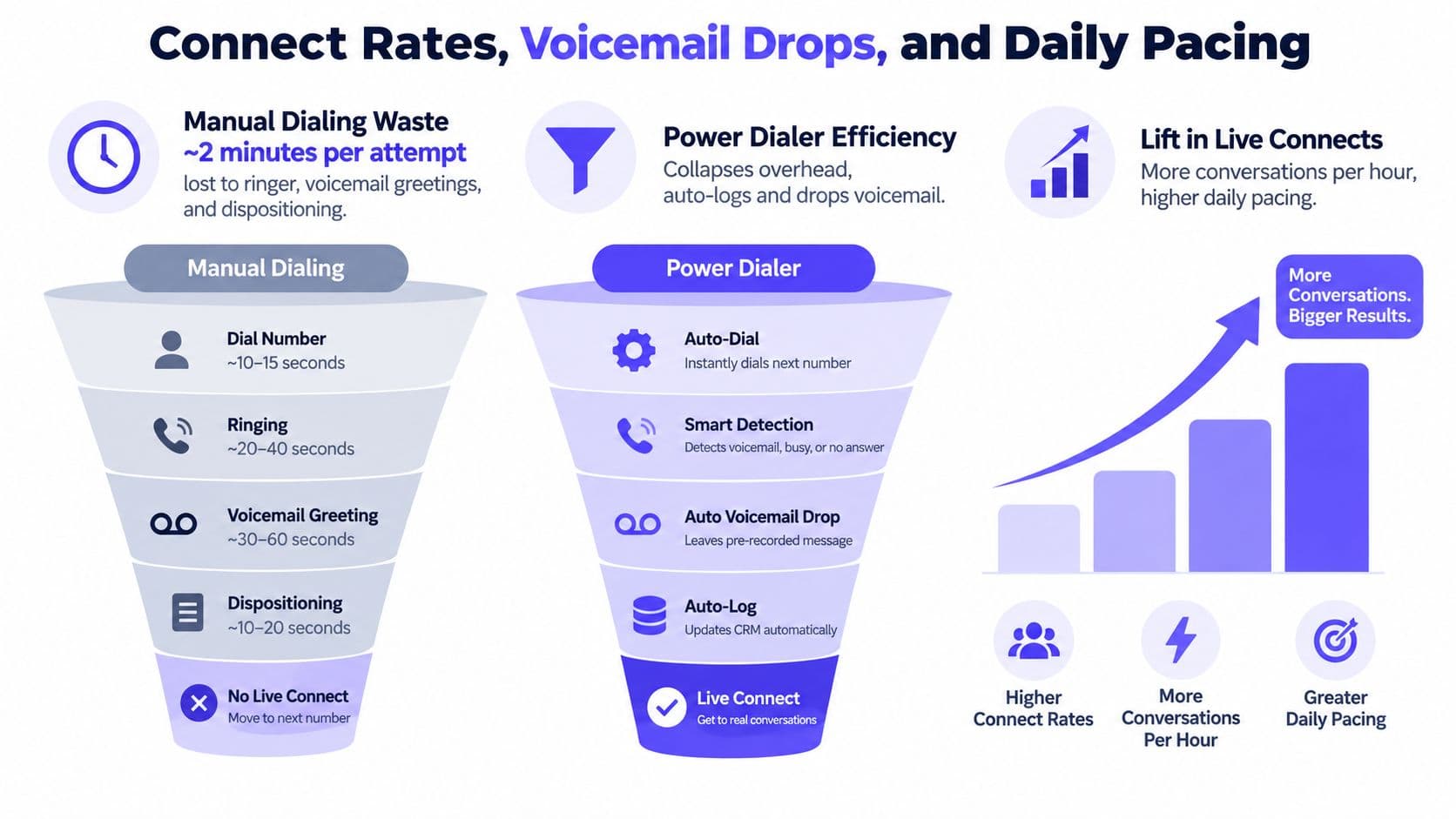
Local presence and answer behavior
One common way teams try to lift answer rates is local presence dialing. In one dataset, non-local cold calls connected at 1.95% while local-number calls connected at 3.2%, a lift of more than 64% (local presence call connection data).
Here is what is happening in the queue:
- The dialer checks the next lead's area or geography.
- It selects an approved outbound number that matches that area.
- The rep places the call through that number.
- The system logs which caller ID was used, which matters later if you need to review performance or investigate spam labeling.
Local presence helps at the margin. It does not rescue a bad list, weak timing, or poor targeting. It removes one avoidable reason a prospect may ignore the call.
Voicemail drop in the production workflow
Voicemail drop is usually a prerecorded audio file tied to a specific branch in the call result logic. A new rep often assumes the system "hears voicemail and leaves a message." In production, the setup is more specific than that.
The dialer places one call. If a person answers, the rep takes the conversation. If the call resolves to a mailbox and your rule allows voicemail drop, the system can play the saved recording, mark the attempt with the right disposition, and queue the next follow-up. If your rules do not allow it, the system logs the no-answer or voicemail outcome and moves on.
That branch logic matters because it affects both rep pacing and record quality. Reps should not spend 20 seconds repeating the same message and then another 15 seconds typing the same note. The system should handle that work consistently.
A clean voicemail setup usually includes:
- One short recorded message per use case: new prospect, follow-up, or post-demo outreach
- Clear disposition mapping: voicemail left, voicemail detected but skipped, or no mailbox
- Automatic next-step rules: schedule the next call or trigger another touch based on the outcome
If a platform makes voicemail drop easy but leaves logging messy, the team saves seconds on the call and loses minutes cleaning up records later.
How to pace a day without wrecking call quality
Daily pacing is where many teams misuse power dialers. New reps see faster dialing and assume they should stay in the queue all day. In practice, power dialing works better like interval training than a nonstop treadmill.
Use focused calling blocks. Leave room between blocks for notes, callbacks, and follow-up tasks. Reps need a few seconds before the next attempt to read the record, especially if the previous call created a task, objection note, or meeting request.
The best pacing rule is simple. The dialer should set the tempo, not rush the rep past the point where call quality drops. If the queue moves so fast that reps skip notes, forget context, or sound flat by the third block, the system is configured for volume instead of control.
That trade-off shows up in metrics quickly. Connect rates may look stable while data quality gets worse, follow-up lags, and duplicate touches increase. A well-run power dialer program protects both throughput and clean execution.
How a Power Dialer Fits Into CRM and Workflows
A power dialer becomes useful when it stops being a separate phone tool and starts acting like part of your operating system.
The first handshake is between the dialer and the contact record. The dialer pulls the next lead from a filtered view or smart list. Then, after the attempt, it writes the result back into the same record so the next rep, manager, or automation sees the current state.
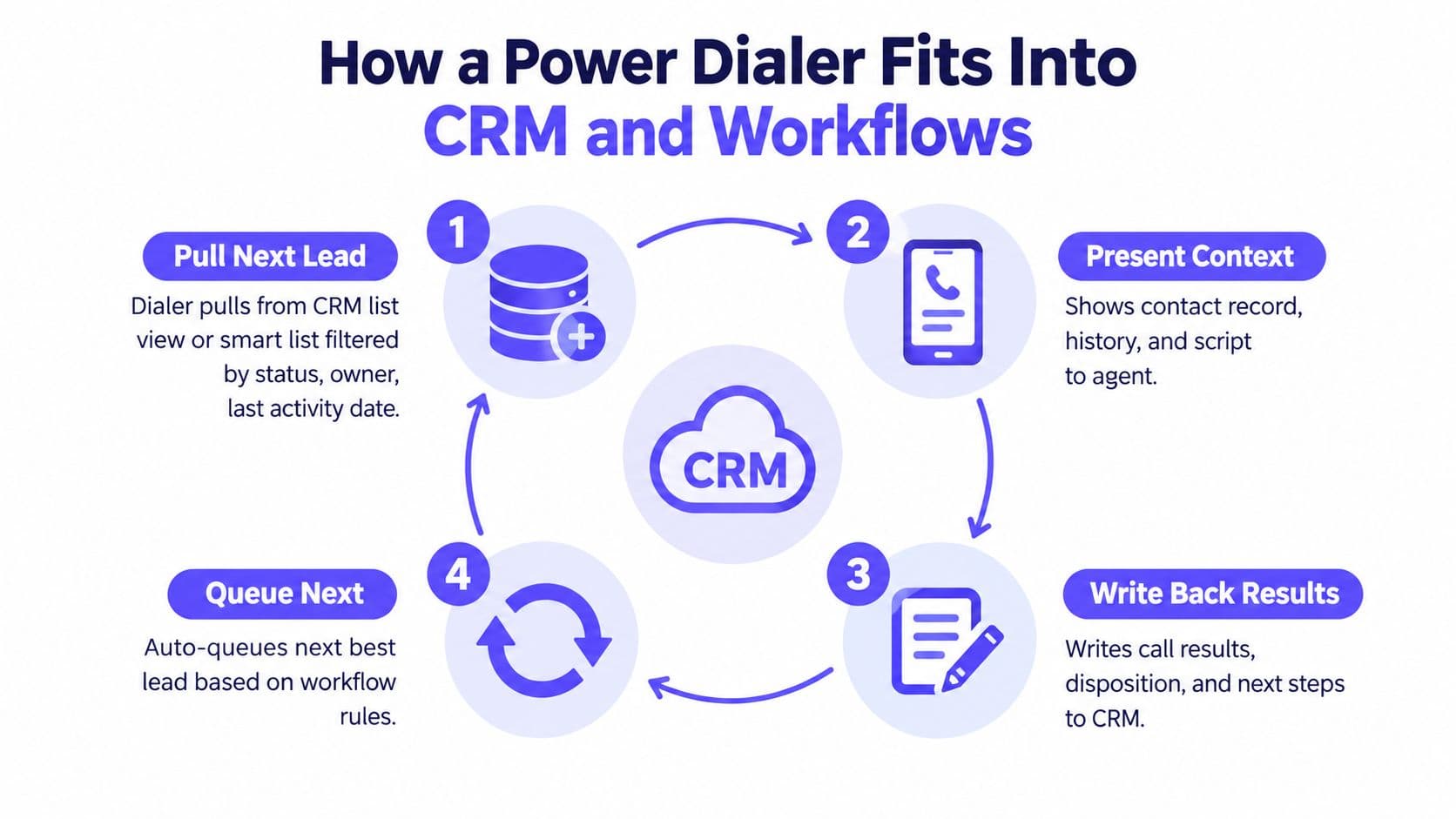
What the CRM handoff should include
When you review a platform's CRM integration workflow, look for a few basics:
- Filtered queue input: status, owner, territory, and last activity date should determine who gets dialed.
- Automatic activity logging: every attempt should land on the timeline without manual copy-paste.
- Outcome mapping: dispositions should connect to stages, tasks, or follow-up rules.
Some systems fall apart. They can dial, but they don't preserve clean records. That creates sloppy ownership, duplicate touches, and follow-up gaps.
One contact record, multiple channels
The strongest setup keeps phone, SMS, and email against the same contact. That way the rep doesn't need a second inbox or a second tool to see whether the prospect already replied.
A normal sequence might look like this:
| Workflow moment | What the rep does | What the system should log |
|---|---|---|
| Before the call | Opens the queued lead | Contact history and prior activities |
| After voicemail | Sends a templated follow-up | SMS or email logged to the same record |
| After a live connect | Qualifies and books next step | Call result, notes, task, and meeting event |
If a rep reaches a qualified lead, the best next action often isn't another call. It's booking time. Some teams send a calendar link from the call screen so a confirmed meeting writes back as an event instead of living in someone's inbox.
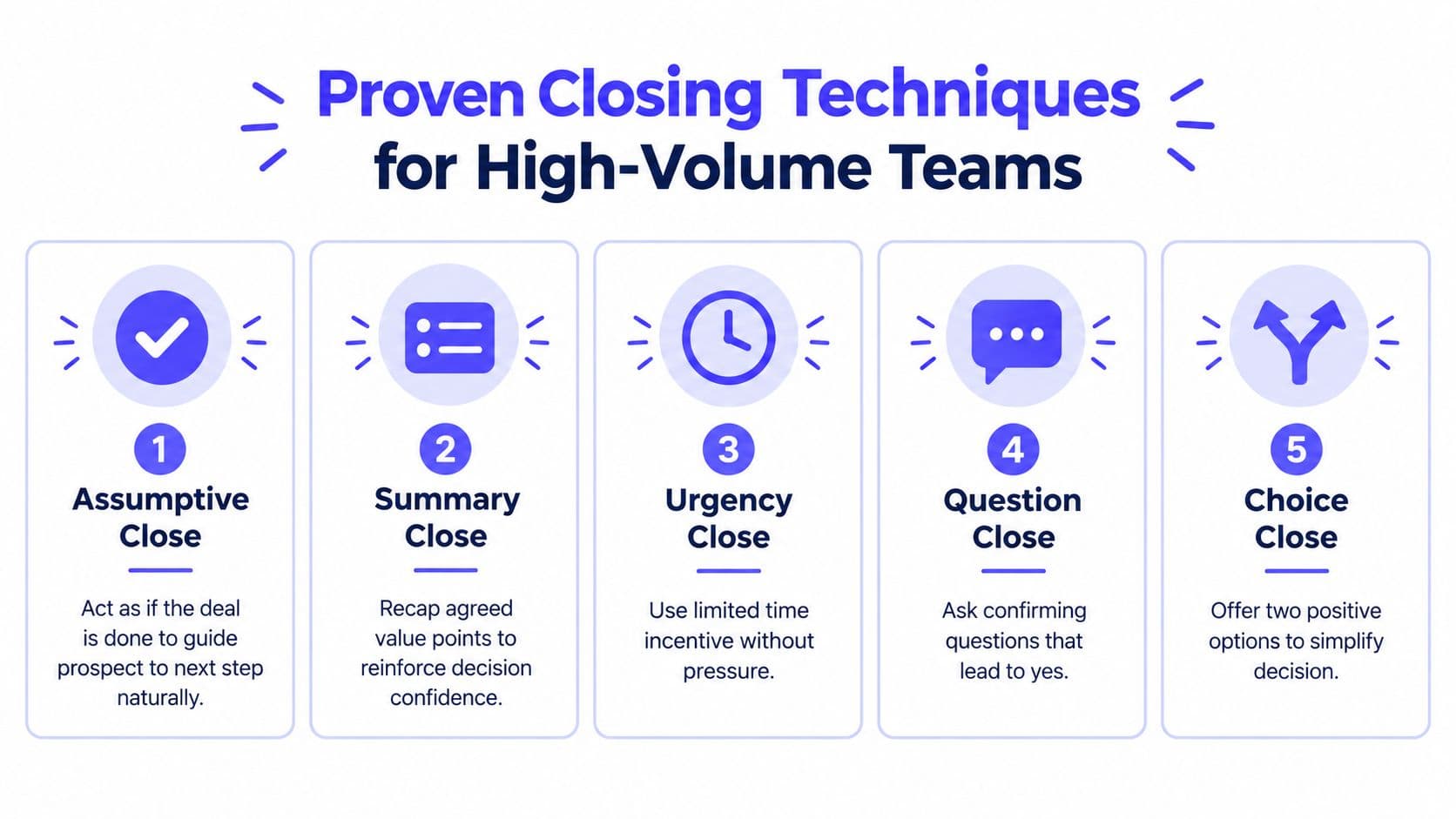
Getting to that booked meeting is its own skill. The close sales techniques that hold up in high-volume outbound — the assumptive close, LAER objection handling, and a structured multi-touch follow-up — are what turn a live connect into a committed next step.
Where workflow rules help
You don't need fancy automation to get value. A few simple rules usually carry the load:
- Connected call: move the lead to the next stage or assign a task.
- Voicemail after repeated attempts: enroll the contact into a nurture sequence.
- Bad number: suppress future calls until data is corrected.
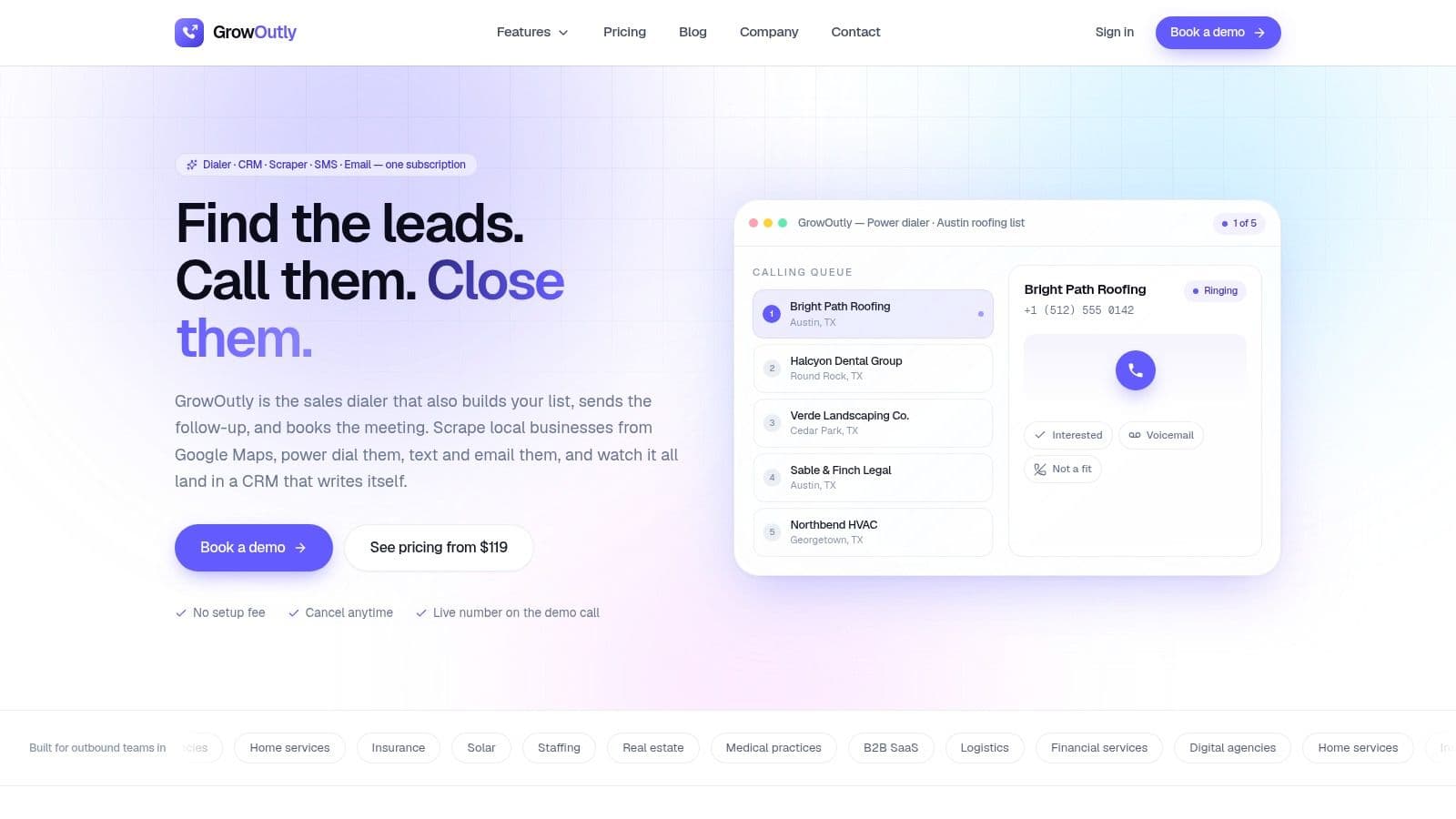
One example is GrowOutly, which combines a power dialer, messaging, email outreach, and CRM in one workspace so the call, the follow-up, and the record update happen inside the same system. That's useful for teams that want one queue instead of stitching together separate tools.
Compliance Boundaries Buyers Often Overlook
This is the part many teams oversimplify. A power dialer can support a safer calling motion, but it doesn't make your campaign compliant by default.
Current buyer confusion usually comes from one bad shortcut: assuming that if a platform is called a power dialer, the legal risk is solved. It isn't. Recent industry guidance has started framing power dialers as a control-and-compliance choice, not just a speed tool, but it still leaves gaps around calling windows, DNC handling, and caller ID reputation management (compliance nuance in power dialing).
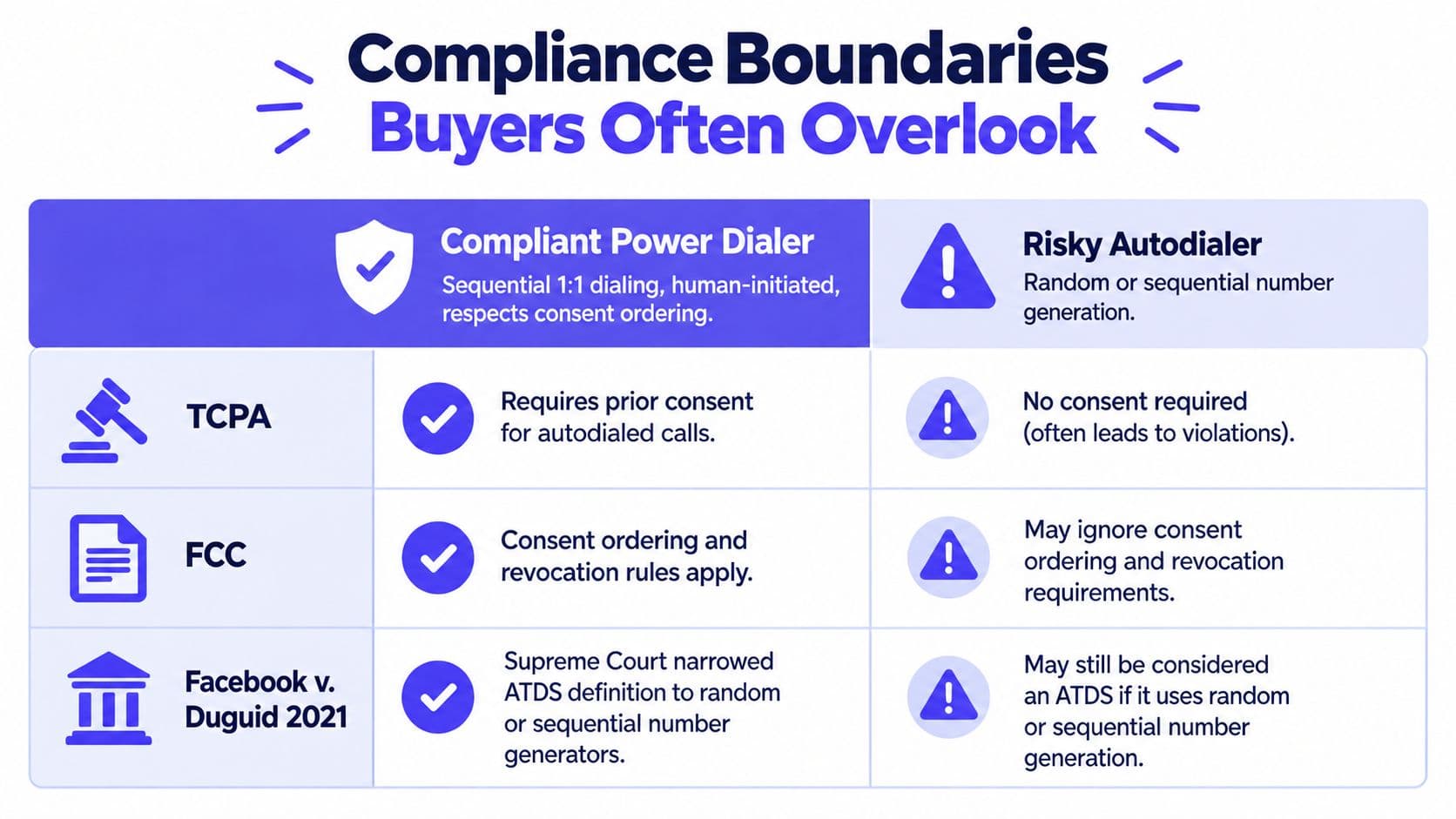
What changed and what didn't
The legal shift many teams care about most is the 2021 Facebook v. Duguid ruling discussed earlier. It narrowed the autodialer definition around random or sequential number generation. That changed how many vendors and outbound teams describe list-based dialing.
What didn't change is the need to manage outreach rules upstream. Your list still needs valid consent handling where required, internal opt-outs still need suppression, and calling windows still need enforcement.
The controls buyers should ask about
When you evaluate a platform's DNC compliance controls, ask how it handles the list before the call leaves the system.
Look for safeguards like:
- Consent fields on the record: the dialer should read them, not ignore them.
- DNC suppression: national, internal, and other applicable suppression sources should block ineligible contacts.
- Local time restrictions: the system should respect timezone-based calling windows.
- Caller ID hygiene: number rotation and reputation monitoring should be part of operations.
A power dialer is a productivity layer. Consent management still starts at lead capture, form language, imports, and suppression policy.
Why buyers get tripped up
The biggest mistake is treating compliance like a setting you flip on after go-live. It isn't. If your lead sources are messy, your opt-out data is stale, or your reps can override suppression without controls, the dialer only helps you move faster in the wrong direction.
That's why power dialers are best understood as operationally safer when configured for human-initiated, list-based outreach, not as a legal shortcut.
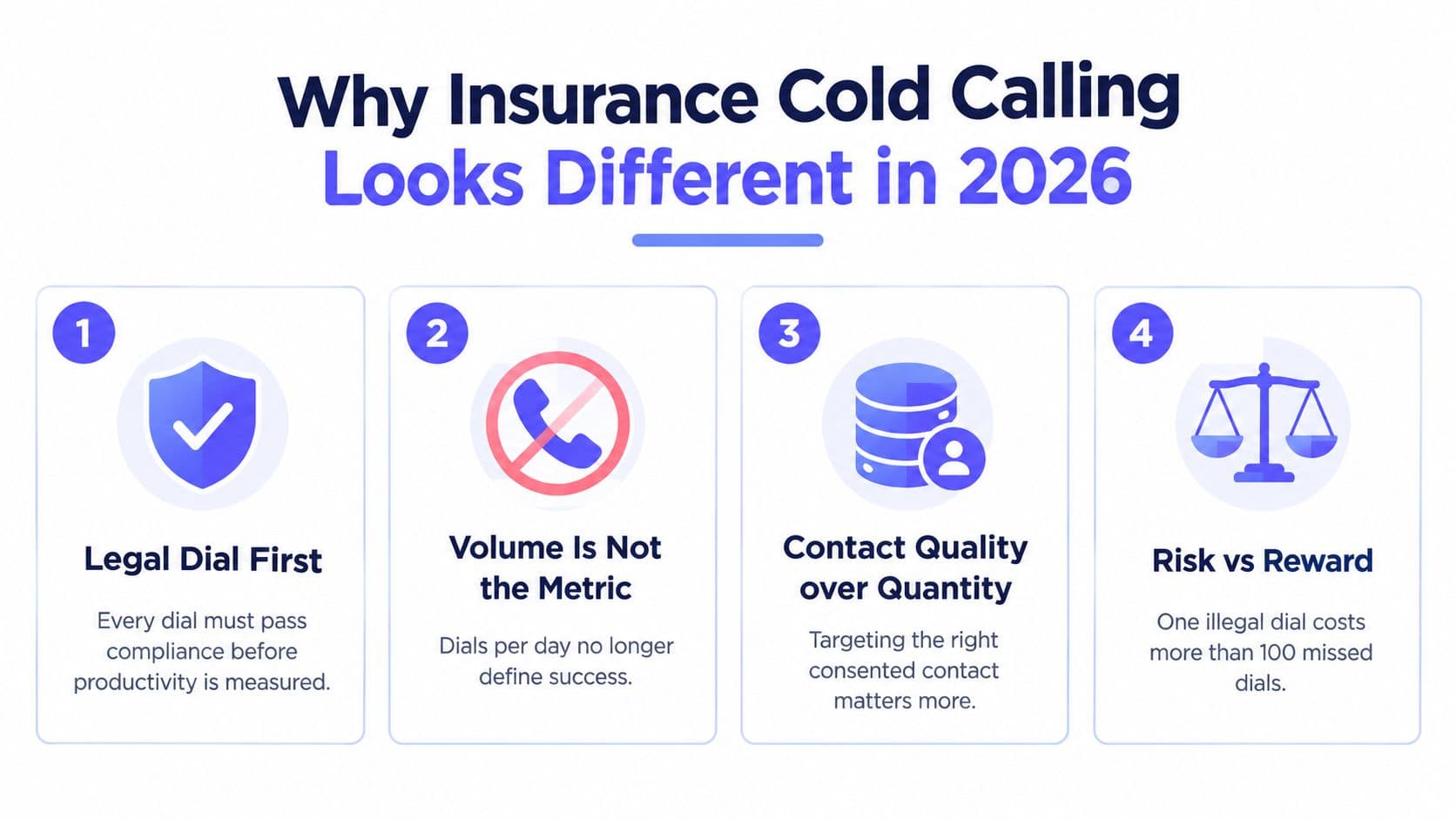
Regulated verticals make this concrete. The compliance gate in our cold calling for insurance playbook — DNC scrubbing cadence, state calling windows, and timestamped suppression exports — is the work that has to happen before the dialer ever gets the list.
Best Practices and a Buyer Checklist
Without standardized pacing, list hygiene, and rep behavior, even a feature-rich dialer won't produce consistent results.
Best practices that hold up in production
-
Use calling blocks, not all-day dialing. Focused sessions work better than leaving the dialer running in the background. The common pattern is a concentrated block, then time for notes and follow-up.
-
Keep voicemail logic simple. Decide whether your campaign drops a message or skips voicemail. Don't let every rep improvise the rule.
-
Rotate local numbers carefully. Local presence can help answer behavior, but only if you spread usage and watch number health.
-
Log dispositions immediately. Reps should finish the record while the call is fresh. If logging slips, data quality usually collapses first and coaching quality follows.
-
Protect prep time for higher-value lists. If the account needs real research, don't force pure speed mode. Use a workflow that gives the rep enough context before the bridge.
Buyer checklist for vendor demos
Bring these questions to the demo and insist on workflow-level answers:
- Can reps override pacing? You want control when list quality changes or coaching shows reps need more room.
- How do dispositions map into CRM stages? If outcomes don't map cleanly, your reporting will drift.
- What happens to in-flight calls if a rep disconnects? Queue behavior during failures matters more than the glossy UI.
- How does voicemail detection behave? You want to see the actual branch logic, not just a feature badge.
- How is DNC scrubbing enforced? Ask whether suppression happens before the call attempt and how exceptions are handled.
- What does the rep screen show before connect? Context quality shapes conversion quality.
- How are retries queued? Good retry rules prevent spammy repeat attempts and missed follow-up alike.
A candid rule of thumb: the best power dialer isn't the one with the longest feature list. It's the one your reps will keep open, trust, and use consistently.
GrowOutly offers a cloud-based outbound workspace that combines a power dialer, two-way messaging, email outreach, and a built-in CRM, so reps can move from call to follow-up without switching tools. If you're trying to turn power dialing into a cleaner daily workflow instead of just adding more call volume, visit GrowOutly to see how the pieces fit together.